
While reviewing AWS Security Hub findings in my AWS environment, I cam across this one:
“Amazon EC2 should be configured to use VPC endpoints that are created for the Amazon EC2 service.”
What is EC2 VPC Interface Endpoints
VPC Service Endpoint for EC2 is ec2.<region>.amazonaws.com.
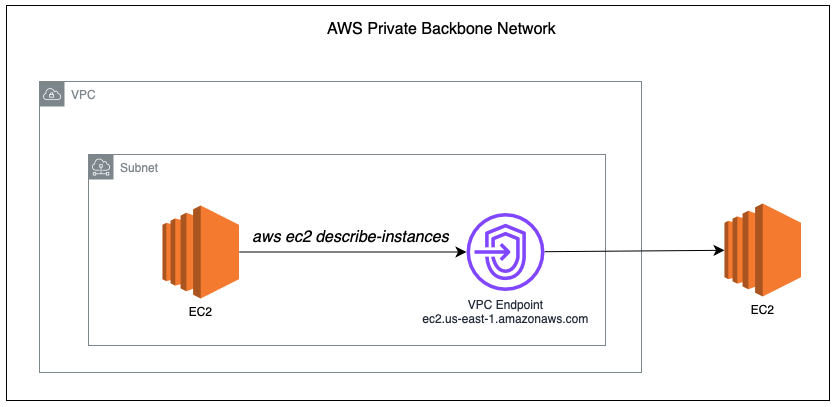
When you call the EC2 API from resources within the VPC (e.g., aws ec2 describe-instances), it reaches out to the service endpoint ec2.us-east-1.amazonaws.com.
By default, this resolves to a public IP address, and this traffic will leave your VPC and go through a NAT Gateway or Internet Gateway, even if the EC2 instance is in a private subnet.
Public Endpoint Behavior
If you haven’t configured a VPC Interface Endpoint, you will get the public IP address when you try to resolve ec2.us-east-1.amazonaws.com.
sh-5.2$ nslookup ec2.us-east-1.amazonaws.com
Server:         10.0.0.2
Address:        10.0.0.2#53

Non-authoritative answer:
Name:   ec2.us-east-1.amazonaws.com
Address: 52.46.155.190
If you enabled Route 53 Resolver DNS query logging, you can confirm this by running any EC2 API call on the EC2 Instance, you will see the DNS query logs in the CloudWatch.
aws ec2 describe-instancesOn the DNS Resolver logs, the DNS log will show the public resolution, proving that EC2 CLI / API calls are routed through the public internet path.

VPC Endpoint behavior
Once you created a VPC interface endpoint for EC2, the domain name remains the same (ec2.us-east-1.amazonaws.com), but it now resolves to a private IP address inside your VPC.
These IP addresses belong to the Elastic Network Interfaces (ENIs) in your subnets.
sh-5.2$ nslookup ec2.us-east-1.amazonaws.com
Server:         10.0.0.2
Address:        10.0.0.2#53

Non-authoritative answer:
Name:   ec2.us-east-1.amazonaws.com
Address: 10.0.0.26
Name:   ec2.us-east-1.amazonaws.com
Address: 10.0.0.225
With this, my AWS CLI for EC2 will now pass through the VPC endpoint instead of public Internet.

With VPC Interface Endpoint:
- EC2 API traffic is routed entirely inside your VPC
- No NAT Gateway or Internet Gateway is involved
- The endpoint uses AWS’s private backbone network
CloudFormation Template
Below is the CloudFormation Template to enable EC2 VPC Endpoint.
  EC2VpcEndpoint:
    Type: AWS::EC2::VPCEndpoint
    Properties:
      VpcId: <VPC ID>
      ServiceName: !Sub "com.amazonaws.${AWS::Region}.ec2"
      VpcEndpointType: Interface
      SubnetIds:
        - <Subnet ID 1>
        - <Subnet ID 2>
      SecurityGroupIds:
        - <Security Group ID>
PrivateDnsEnabled: true Important: The security group must allow inbound TCP 443 from your EC2 instances.
Why This Matters?
- Security: All the traffic now stays within the Amazon private backbone, no longer exposed to the public Internet.
- Cost: Eliminates NAT Gateway data transfer charges
Note: There is hourly charge for AWS VPC Endpoint for EC2.
Conclusion
If you are running automation or operational scripts from the EC2 instances, consider adding VPC Interface Endpoints.
It enhanced your overall security by keeping the traffic within controlled network, eliminates reliance on public endpoints, and helps you close out related findings in AWS Security Hub.

Leave a Reply