

Disclaimer: This post’s content was generated with AI’s assistance.
In my previous blog post, I explored the benefits of serverless architecture using AWS Lambda and API Gateway. Now, let’s dive deeper and see how we can leverage Terraform to automate the deployment of this infrastructure.
Terraform is an Infrastructure as Code (IaC) tool that defines infrastructure resources (like Lambda functions and API Gateways) in a human-readable format. This blog post will guide you through a Terraform script that creates a complete serverless backend on AWS.
What We Will Build
This Terraform script will create the following resources:
- IAM Role: A role with the necessary permissions for executing the Lambda function.
- Lambda Function: A Python function deployed as a Lambda function.
- API Gateway: An API Gateway endpoint that triggers your Lambda function.
Let’s Break Down the Code
The Terraform script can be divided into several sections:
1. Variables and Locals:
This section defines variables and locals used throughout the script. Variables like application and function_name allow you to customize your deployment. Locals, such as full_name, combine these variables to create unique names for your resources.
data "aws_region" "current" {}

data "aws_caller_identity" "current" {}

variable "application" {
    description = "Application Name"
    type = string
    default = "pumoxi"
}

variable "function_name" {
    description = "Name of the Function"
    type = string
    default = "blogpost20240820"
}

locals {
    full_name = "${var.application}-${var.function_name}"
    domain_name = "${var.application}.com"
}
2. IAM Role:
The aws_iam_role resource creates a role named after your application and function. It also defines a policy document data.aws_iam_policy_document that grants the role permission to assume itself (required by Lambda) and write logs to CloudWatch Logs.
resource "aws_iam_role" "iam_for_lambda" {
    name = local.full_name
    assume_role_policy = data.aws_iam_policy_document.assume_role.json

    tags = {
        Application = "${var.application}"
        Function = "${var.function_name}"
    }
}

data "aws_iam_policy_document" "assume_role" {
  statement {
    effect = "Allow"

    principals {
      type        = "Service"
      identifiers = ["lambda.amazonaws.com"]
    }

    actions = ["sts:AssumeRole"]
  }
}

resource "aws_iam_role_policy" "role_policy" {
  name = local.full_name
  role = aws_iam_role.iam_for_lambda.id

  policy = jsonencode (
    {
      Version = "2012-10-17"
      Statement =[
        {
          "Action": "logs:CreateLogGroup",
          "Resource": "arn:aws:logs:${data.aws_region.current.name}:${data.aws_caller_identity.current.account_id}:*",
          "Effect": "Allow"
        },
        {
          "Action": [
            "logs:CreateLogStream",
            "logs:PutLogEvents"
          ],
          "Resource": "arn:aws:logs:${data.aws_region.current.name}:${data.aws_caller_identity.current.account_id}:log-group:/aws/lambda/${local.full_name}:*",
          "Effect": "Allow"
        }
      ]
    }
  )
}
3. Lambda Function:
This section defines the aws_lambda_function resource. Here’s what’s happening:
function_name: Uses thelocal.full_nameto create a unique name based on your application and function name.handler: Specifies the function entry point within your Lambda code (lambda.main).runtime: Defines the runtime environment for your function (python3.11).filename: Points to the compressed Lambda code zip file generated by thedata.archive_fileresource.role: Assigns the IAM role created earlier to grant the necessary permissions for the function.source_code_hash: Ensures deployment updates when the Lambda code changes.tags: Assign tags for easier resource management.
data "archive_file" "lambda" {
    type = "zip"
    source_file = "../lambda/lambda.py"
    output_path = "../lambda/lambda.zip"
}

resource "aws_lambda_function" "lambda" {
    function_name = local.full_name
    handler = "lambda.main"
    runtime = "python3.11"
    filename = "../lambda/lambda.zip"
    role = aws_iam_role.iam_for_lambda.arn

    source_code_hash = data.archive_file.lambda.output_base64sha256
    timeout = 300 # 1 minute

    tags = {
        Application = "${var.application}"
        Function = "${var.function_name}"
    }
}
4. Lambda Permissions:
The aws_lambda_permission resource grants API Gateway permission to invoke your Lambda function.
resource "aws_lambda_permission" "apigw_lambda" {
    statement_id = "AllowExecutionFromAPIGateway"
    action = "lambda:InvokeFunction"
    function_name = aws_lambda_function.lambda.function_name
    principal = "apigateway.amazonaws.com"

}
5. API Gateway:
The aws_apigatewayv2_api resource creates an API Gateway with a name based on your application and function. It includes a description of the configuration of the protocol type.
resource "aws_apigatewayv2_api" "api" {
    name = local.full_name
    protocol_type = "HTTP"
    description = "API Gateway V2 for ${local.full_name}"

    tags = {
        Application = "${var.application}"
        Function = "${var.function_name}"
    }
}
6. API Gateway Stages and Deployment:
aws_apigatewayv2_stage: Defines a production stage (“prod”) for your API that points to the latest deployment.aws_apigatewayv2_deployment: Creates a deployment for your API. It uses a trigger based on a hash of the involved resources (integration, routes) to ensure automatic redeployment when changes are made.
resource "aws_apigatewayv2_stage" "api" {
    api_id = aws_apigatewayv2_api.api.id
    name = "prod"
    deployment_id = aws_apigatewayv2_deployment.api.id
}

resource "aws_apigatewayv2_deployment" "api" {
    api_id = aws_apigatewayv2_api.api.id

    triggers = {
        redeployment = sha1(join(",",tolist([
jsonencode(aws_apigatewayv2_integration.api_integration),            jsonencode(aws_apigatewayv2_route.api_route_POST),
jsonencode(aws_apigatewayv2_route.api_route_OPTIONS),
])))
    }

    lifecycle {
      create_before_destroy = true
    }
}
7. API Gateway Integration and Routes:
aws_apigatewayv2_integration: Defines an integration between your API Gateway and your Lambda function. It uses the AWS Proxy integration type to pass incoming requests directly to your Lambda function.aws_apigatewayv2_route: Creates two routes for your API:- A POST route for your specific function path (
/followed by thefunction_name). - An OPTIONS route to handle pre-flight CORS requests.
- A POST route for your specific function path (
resource "aws_apigatewayv2_integration" "api_integration" {
    api_id = aws_apigatewayv2_api.api.id
    integration_type = "AWS_PROXY"
    integration_method = "POST"
    integration_uri = aws_lambda_function.lambda.invoke_arn
}

resource "aws_apigatewayv2_route" "api_route_POST" {
    api_id = aws_apigatewayv2_api.api.id
    route_key = "POST /${var.function_name}"
    target = "integrations/${aws_apigatewayv2_integration.api_integration.id}"
}

resource "aws_apigatewayv2_route" "api_route_OPTIONS" {
    api_id = aws_apigatewayv2_api.api.id
    route_key = "OPTIONS /${var.function_name}"
    target = "integrations/${aws_apigatewayv2_integration.api_integration.id}"
}
8. Outputs:
The output block exposes the generated API endpoint URL for future use.
output "api_URL" {
    value = aws_apigatewayv2_api.api.api_endpoint
}
Testing and Deployment
Before applying the Terraform configuration, ensure you have the Terraform CLI installed and configured with AWS credentials.
- Initialize Terraform: Run
terraform initto download the required Terraform providers. - Plan the changes: Run
terraform planto see a preview of Terraform’s infrastructure changes. - Apply the changes: Once you’re satisfied with the plan, run
terraform applyto create the infrastructure.
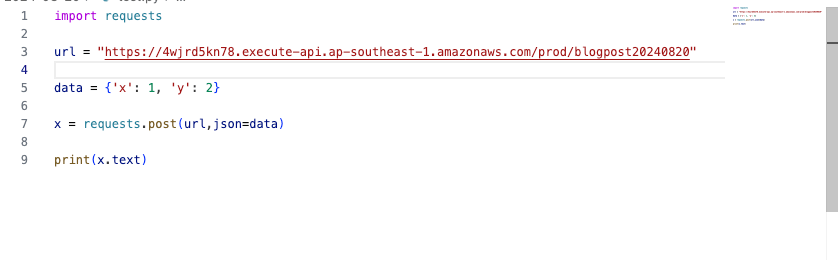
Demo


Conclusion
This blog post demonstrates how Terraform can be used to automate the deployment of a serverless backend with AWS Lambda and API Gateway. This approach offers benefits like infrastructure as code, version control, and repeatable deployments.

Leave a Reply